


Post content has been hidden

To unblock this content, please click here

Jessica
Master July 2012

WWGuest Tool - Invite Sent?

Jessica, on May 23, 2012 at 1:20 PM Posted in Planning 0 3

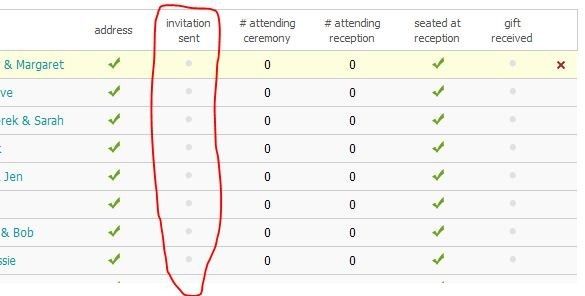
How do I get the check-mark for "invitation sent" on my guest tool? I have all the addresses, and I'm preparing to mail out invites today- but I can't figure out where I enter in the info to WW so the guest list knows I sent the invite.

I found this tool very helpful in tracking who I had addresses from or not, and I'd like to get the same use out of it for invites.

Thanks Ladies!

3 Comments

Latest activity by Just Reenski, on May 23, 2012 at 1:28 PM
  • Just Reenski
    Master December 2012
    Just Reenski ·
    • Flag
    • Hide content

    You have to do it under Ceremony or Reception, looks like you're in the overview. In either event, under Settings, make sure you have "Track invitations" checked so it shows you an invitations box. Use the batch edit tool, so you can do them all at once.


    • Reply
  • Jessica
    Master July 2012
    Jessica ·
    • Flag
    • Hide content

    Thank you Reenski! I'd looked all over those pages, but hadn't been to Settings for that "track invitations" button. So much easier now!

    • Reply
  • Just Reenski
    Master December 2012
    Just Reenski ·
    • Flag
    • Hide content

    No prob, just added step by step pictures, in case anyone else also needs help.

    • Reply

You voted for . Add a comment 👇

×
WeddingWire celebrates love ...and so does everyone on our site! Explore how we embrace diversity

Groups

WeddingWire article topics