Post content has been hidden

To unblock this content, please click here

Sonya
Expert June 2015

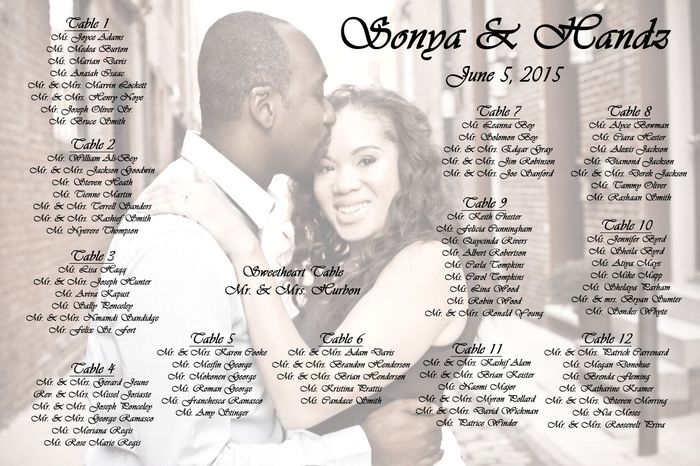
MY DIY Picture Seating Chart so far! *Updated* new chart

Sonya, on May 18, 2015 at 5:21 PM Posted in Do It Yourself 0 21

It's not finished yet, but this is what I have done so far....thoughts?


21 Comments

Latest activity by Sonya, on May 20, 2015 at 12:41 PM
  • Ms. P to Mrs. P
    VIP July 2015
    Ms. P to Mrs. P ·
    • Flag
    • Hide content

    It looks great! My only question is how easy is it to read the font? It is hard to tell on the computer.

    • Reply
  • Sonya
    Expert June 2015
    Sonya ·
    • Flag
    • Hide content

    Thank you!! I printed at work in color just to make sure and it's visible. I have it bolded and the picture variance is slightly lighter.

    • Reply
  • Ostrich
    Master April 2016
    Ostrich ·
    • Flag
    • Hide content

    Ugh i started mine yesterday too... i'm having 26 tables so space is getting awkward.

    • Reply
  • Sonya
    Expert June 2015
    Sonya ·
    • Flag
    • Hide content

    @e=mc2 maybe do 2 charts??

    • Reply
  • Nay0801
    VIP August 2015
    Nay0801 ·
    • Flag
    • Hide content

    How does one accomplish this awesomeness?!?!

    • Reply
  • Sonya
    Expert June 2015
    Sonya ·
    • Flag
    • Hide content

    @Nay start with a JPEG of your pic and edit in Photoshop, paint, or any other software of your choice. Make sure you select transparency.

    • Reply
  • Crystal L.
    Master August 2015
    Crystal L. ·
    • Flag
    • Hide content

    Super cute! =)

    • Reply
  • .
    Master October 2013
    .... ·
    • Flag
    • Hide content

    Cool, but very hard to read. Needs less opacity. Have you checked that the resolution for the picture is high enough to print at the size you want as well? Otherwise it may get distorted when you print.

    • Reply
  • Nay0801
    VIP August 2015
    Nay0801 ·
    • Flag
    • Hide content

    Thanks@ Sonya this is absolutely adorable!

    • Reply
  • Sonya
    Expert June 2015
    Sonya ·
    • Flag
    • Hide content

    @Stephanie I'm going to upload to vistaprint and see before I order anything. I hope it turns out right

    • Reply
  • Debbie
    Super May 2015
    Debbie ·
    • Flag
    • Hide content

    Love it! Haven't seen anything like this before! Want to do mine? Smiley winking

    • Reply
  • Future Mrs. Shermister
    VIP October 2015
    Future Mrs. Shermister ·
    • Flag
    • Hide content

    Looks great!

    • Reply
  • Carole Cohen
    Carole Cohen ·
    • Flag
    • Hide content

    Sonya, if I may, I like that you put all the tables on the left side. I would however take off the "sweetheart table" writing. It is a bit lonely in the middle, and it is right under your breast! If you wanna keep it, make sure to put it somewhere with a blank background, maybe on the cobblestones by your feet.

    Also, Stephanie is right, make sure you're using a high-res pic. Make sure it is at 300 DPI (DPI is Dot Per Inch, it shows the resolution of your picture. 300 is mandatory for prints). I assume you got this pic done by a photographer? They probably sent you the high-res version. If not, ask for it Smiley winking

    • Reply
  • Sophia
    Super September 2015
    Sophia ·
    • Flag
    • Hide content

    Love it!!

    • Reply
  • Sonya
    Expert June 2015
    Sonya ·
    • Flag
    • Hide content

    @Carole yes I got it from my photographer. I'll check the high res on it. It's not finished yet do all the tables aren't listed. I have 12 all together...just getting started. So it will be fully covered.

    • Reply
  • Ziajafashions
    Dedicated June 2015
    Ziajafashions ·
    • Flag
    • Hide content

    You might want to try a white text. It will add more contrast and help with the legibility. Also if your printing this up and putting it in a picture frame make sure you have your text far enough away from the sides or you may end up cutting off the text with the frame.

    • Reply
  • Amber
    VIP June 2016
    Amber ·
    • Flag
    • Hide content

    I love it!

    • Reply
  • Sonya
    Expert June 2015
    Sonya ·
    • Flag
    • Hide content

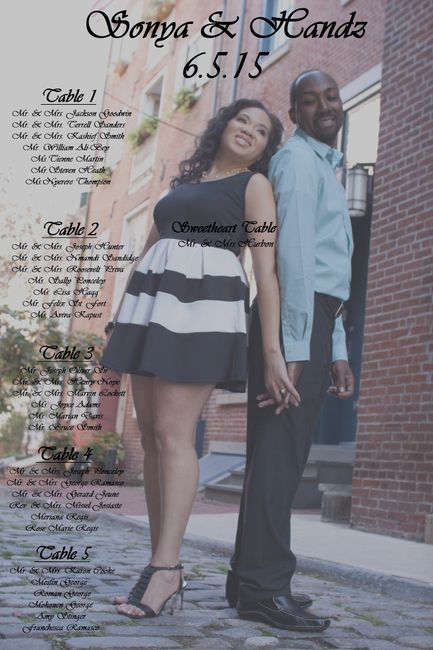
    Thank you guys so much for the info. Because my dpi was too low and I've been editing all morning. I might try a new picture with more space.

    • Reply
  • Sonya
    Expert June 2015
    Sonya ·
    • Flag
    • Hide content

    I changed my entire picture and made a lot of adjustments. Here is my final DIY seating chart. Suggestions, Opinions please? Should I make the wording a little lighter or keep Black?


    • Reply
  • Ms.Beach&Boats
    Expert November 2015
    Ms.Beach&Boats ·
    • Flag
    • Hide content

    Keep it black, and much better to read and see you two. love it!

    • Reply

You voted for . Add a comment 👇

×
WeddingWire celebrates love ...and so does everyone on our site! Explore how we embrace diversity

Groups

WeddingWire article topics